
Embedding in Confluence#
Wireframe demos can be embedded in Confluence pages as animated GIFs. The GIF is generated automatically from the demo by a headless browser during the GitHub Actions build — no manual screen recording needed.
Note
Confluence’s iframe macro uses sandbox="sandbox" which blocks all
JavaScript execution. For this reason, interactive HTML embeds do
not work in Confluence. Animated GIFs are the recommended approach.
If your platform allows JavaScript in iframes (or you are viewing outside Confluence), you can also link directly to the self-contained HTML demo pages on GitHub Pages.
How it works#
Wireframes are authored once in
examples/wireframes/— these are the layout and styling for your demo UI.Demo configs live in
examples/demos/as JSON files. Each config references a wireframe and defines the step sequence:{ "wireframe": "kitchen-sink.html", "title": "Kitchen Sink — All Built-in Actions", "steps": [ "#btn-sidebar@1800:click", "#sidebar@800:toggle-class=open", "#input-search@1500:set-value=pipeline" ], "repeat": true, "height": "420px" }
Multiple configs can reference the same wireframe with different step sequences.
A build script (
examples/build.py) combines each config with its wireframe and inlines the controller JS and CSS into a single self-contained HTML page.A recording script (
examples/record.py) opens each built page in headless Chromium, captures frames during one full playback cycle, and assembles them into an animated GIF. Playback controls are hidden in the recording.GitHub Actions runs both scripts on push and deploys the HTML pages and GIFs to GitHub Pages.
Setting up your project#
Add your wireframe HTML files to
examples/wireframes/.Create a JSON config in
examples/demos/for each demo variant. Seeexamples/demos/kitchen-sink-full.jsonfor a complete example.Test locally:
# Build self-contained HTML pages
python examples/build.py

# Record animated GIFs (requires: pip install playwright Pillow
# and: playwright install chromium)
python examples/record.py

# Check the output
ls _site/*.html _site/*.gif
Push to
main. Thepages.ymlworkflow builds, records, and deploys everything to GitHub Pages automatically.
Embedding in Confluence#
Use Confluence’s built-in image macro to embed the animated GIF:
Get the GIF URL from GitHub Pages:
https://<org>.github.io/<repo>/kitchen-sink-full.gif
In Confluence, insert an image by URL (or use the
!image macro in wiki markup):!https://<org>.github.io/<repo>/kitchen-sink-full.gif!
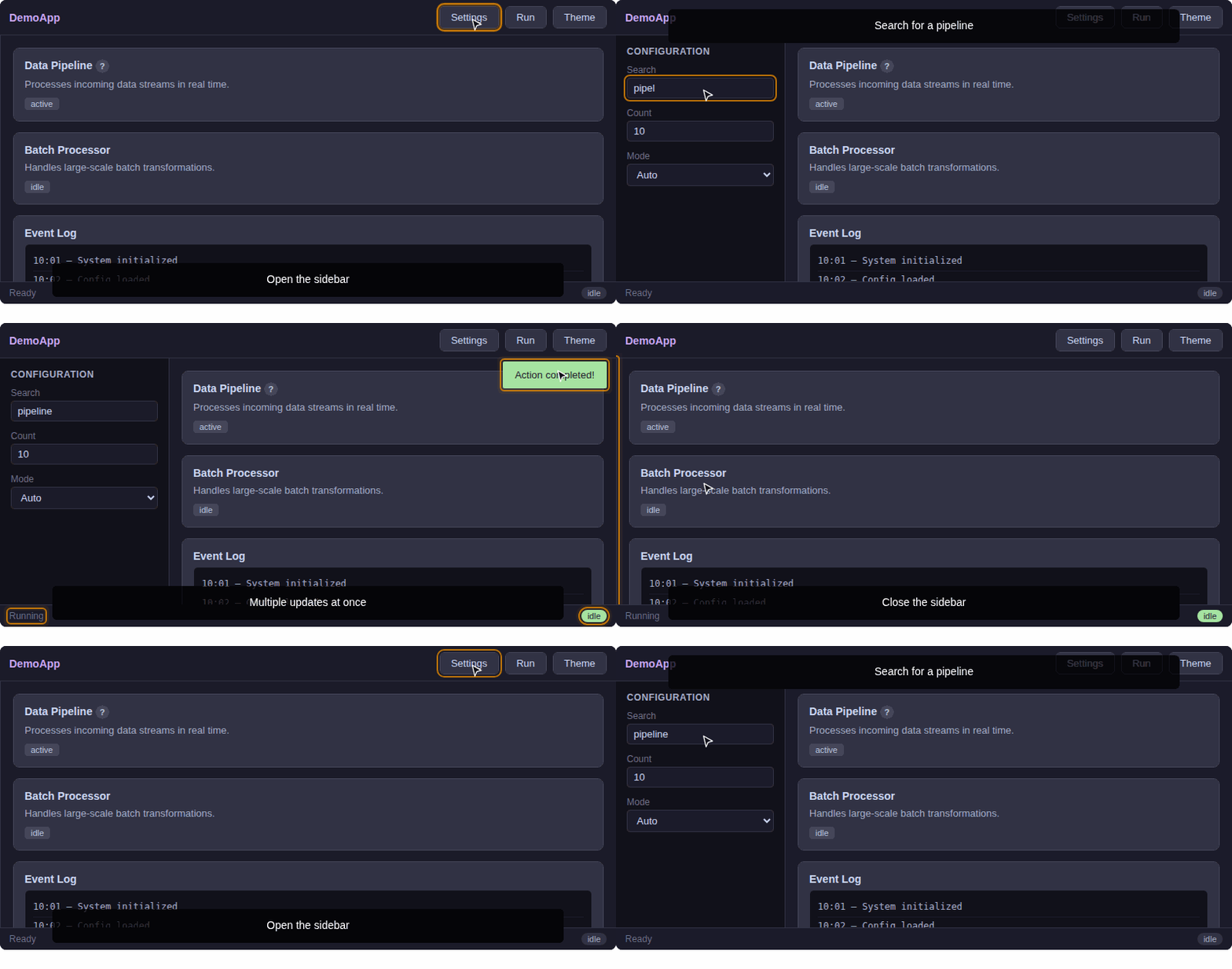
The GIF loops automatically and shows the full demo sequence.
For example, the “kitchen-sink-short” demo GIF hosted on GitHub Pages:
Linking to the interactive version#
For platforms that allow JavaScript in iframes, you can also link directly to the self-contained HTML pages:
https://<org>.github.io/<repo>/kitchen-sink-full.html
These pages include the full interactive demo with play/pause/restart controls. You can use them in any context where JavaScript is permitted (direct links, documentation, non-sandboxed iframes, etc.).
Reusing wireframes with different steps#
The same wireframe can power multiple demos. For example:
examples/
  wireframes/
    kitchen-sink.html          ← one wireframe
  demos/
    kitchen-sink-full.json     ← long demo (all actions)
    kitchen-sink-short.json    ← short demo (highlights only)
Both JSON configs reference "wireframe": "kitchen-sink.html" but
define different step sequences. The build script produces a separate
self-contained HTML page and GIF for each.
Demo config reference#
Key |
Default |
Description |
|---|---|---|
|
(required) |
Filename of the wireframe HTML in |
|
|
Page |
|
|
Array of step shorthand strings or step objects |
|
|
Loop the demo on completion |
|
|
Start automatically when visible |
|
|
Container height in the built page |
|
|
Pause on user clicks inside the demo |
|
|
CSS class(es) applied to the content root on load |
See Configuration Reference for full details on step syntax and options.
Recording options#
The record.py script accepts several options:
python examples/record.py --fps 10 --width 800         # defaults
python examples/record.py --demo kitchen-sink-full      # one demo only
python examples/record.py --site _site --out _site      # custom dirs
Higher --fps produces smoother GIFs but larger files. The default
of 10 fps is a good balance.
Troubleshooting#
- GIF does not appear in Confluence
Verify the GitHub Pages URL loads the GIF correctly in a new browser tab. Check that GitHub Pages is enabled in the repo settings (Settings → Pages → Source: GitHub Actions).
- GIF is too large
Reduce
--fps(e.g.--fps 5) or--width(e.g.--width 600). You can also shorten the step sequence — each step’s delay directly affects the recording duration.- GIF does not show the full demo
The recording duration is calculated from the sum of all step delays plus a 1.5 s buffer. If your demo has very long CSS transitions that extend beyond the step delay, increase the relevant step’s delay.
- Interactive HTML page does not work in Confluence iframe
This is expected. Confluence’s iframe macro uses
sandbox="sandbox"which blocks JavaScript. Use the GIF instead.- Changes aren’t reflected
GitHub Pages has a CDN cache. After pushing changes, wait a few minutes or append a cache-busting query string to the URL (e.g.
?v=2).